Nastran Preprocessor AI Prompt
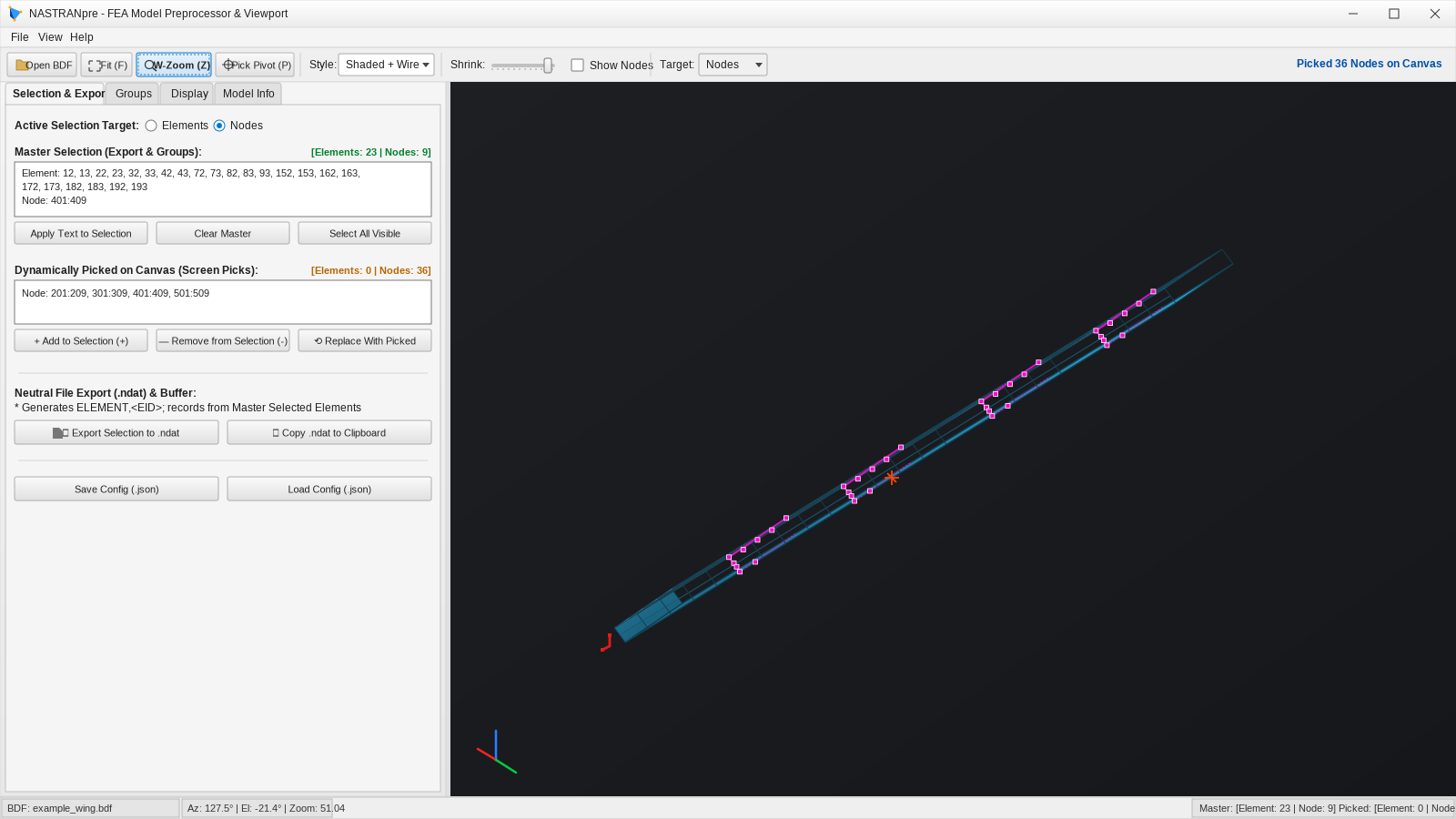
This document provides a breakdown of the System Prompt, the Objective-Specific Prompt, and the functional modules of the NASTRANpre finite element model (FEM) desktop pre-processor.

Date
October 25, 2026Updated
November 02, 2026Category
PromptWord count
2.9k wordsViews
14Document
Nastran Preprocessor AI Prompt
Trapped in the Wireframe Matrix: Why We Built NASTRANpre 🖥️🕸️
If you’ve ever walked into an aerospace or automotive engineering lab and seen someone working on a computer screen that looks like a scene from the 1982 movie Tron, you’ve witnessed the Legacy UNIX Dilemma.
For decades, the engineering world has run on incredible mathematical solvers like NASTRAN. But the tools engineers used to view those models? Many of them were built in the 1980s and 1990s for old UNIX workstations (think Silicon Graphics, Sun Microsystems, or HP-UX terminals).
Back then, graphics hardware was so primitive that computers could only display pure wireframes—thousands of translucent, overlapping lines with zero surface shading, zero depth, and zero lighting.
Here is why that was an absolute nightmare, and why modern tools like NASTRANpre are rescuing engineers from the wireframe jungle.
The "Wireframe Spaghetti" Nightmare 🍝
Imagine someone hands you a blueprint of a skyscraper, but every single wall, pipe, elevator cable, and door on all 100 floors is printed on a single sheet of clear plastic.
Now, try to point your finger at the front entrance without also pointing at the boiler in the basement and the air conditioner on the roof behind it.
That was life in primitive UNIX preprocessors:
1. The "Click-Through" Disaster
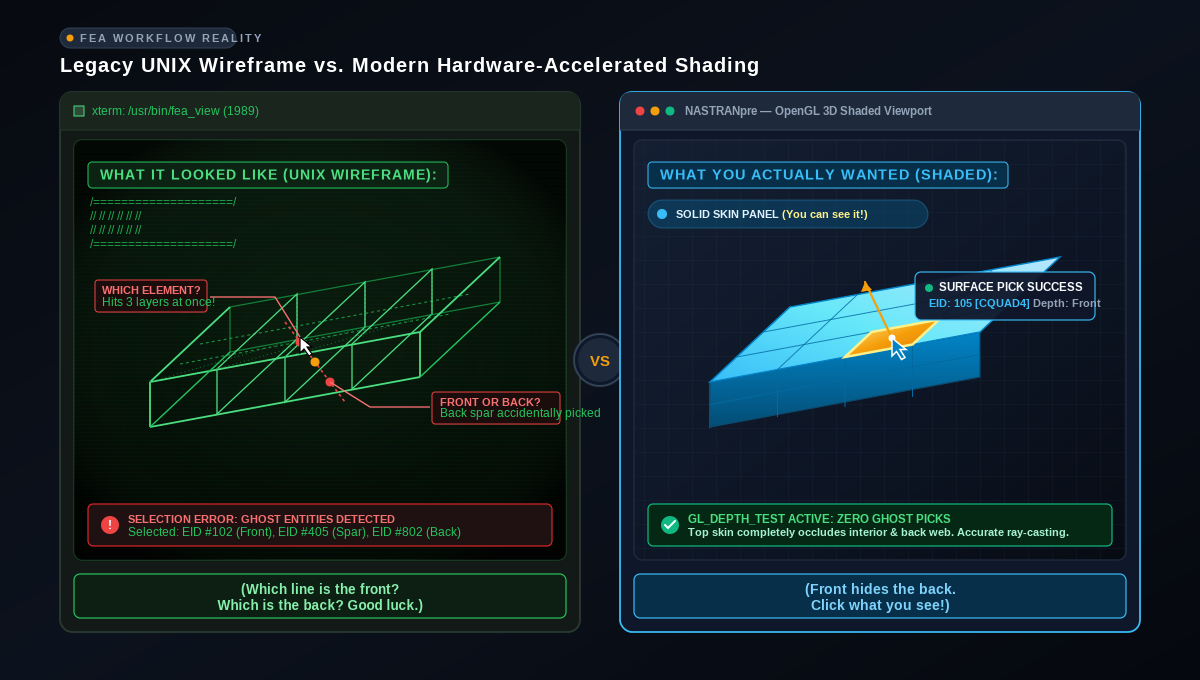
In a primitive wireframe viewer, there is no depth buffer. If you click on an element on the outside wing skin, the computer has no idea whether you meant:
The top wing skin
The internal fuel tank baffle
The structural spar in the middle
Or the bottom wing skin on the opposite side of the airplane!
Engineers spent half their working lives accidentally selecting parts on the other side of the vehicle and having to restart their selections from scratch.
2. Grouping Was an Exercise in Memory Torture
Need to pick 50 fasteners and save them into a reusable group called Wing_Root_Bolts?
In primitive tools, you couldn't just lasso them and hit "Save." You had to manually read terminal text outputs, write down hundreds of ID numbers on a notepad, and type cryptic command lines like:
ga_group_entity_add("Wing_Root_Bolts", "Element 1001:1050")Make a single typo? You just included an engine mount in your bolt group.
3. Coincident Entities Were Completely Invisible
If two nodes (grid points) occupied the exact same coordinate by accident, a wireframe viewer drew them directly on top of each other. They looked like a single innocent green dot. But when the solver ran, the structure would "tear" apart in simulation because the parts weren't actually joined together!
Enter NASTRANpre: Bringing 21st-Century Graphics to Classic Solvers 🚀✨
NASTRANpre was designed to throw open the windows and let fresh air into this vintage workflow. It bridges the gap between battle-tested Nastran math and modern, hardware-accelerated 3D graphics.
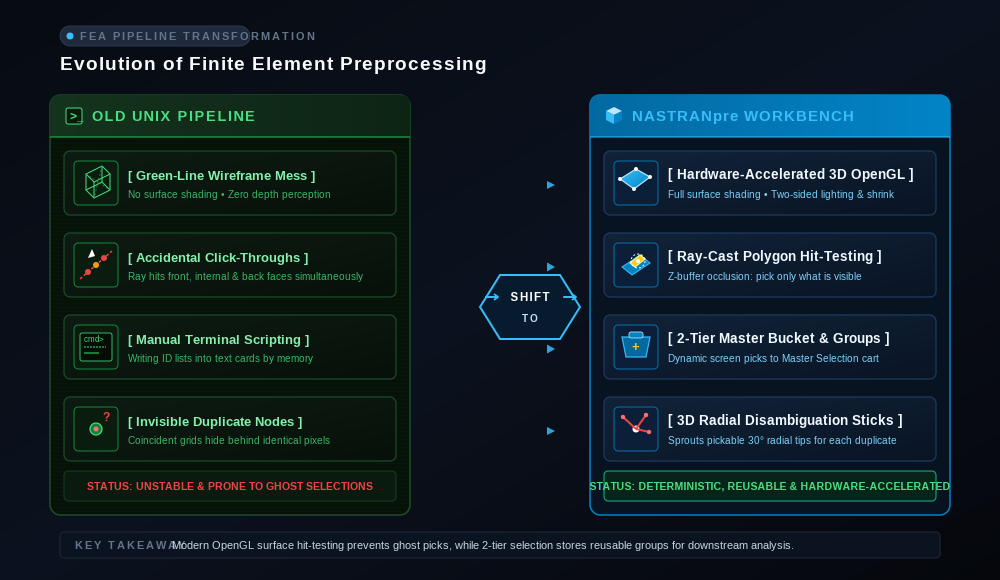
Here is why the difference is night and day:
1. Real Shaded Surfaces with True Depth
Instead of a bird’s nest of wireframe vectors, NASTRANpre renders solid, lit, two-sided shaded surfaces using your modern GPU. Front surfaces naturally hide back surfaces. When you click on the top of a wing, the ray-casting engine hits the top surface only—no more accidental clicks on the undercarriage!
2. The Two-Tier "Shopping Cart" Selection
Selecting entities in NASTRANpre works like online shopping:
Browse & Click: Click on elements or drag a selection box across the screen. They light up in Golden Yellow.
Check the Label: The interface explicitly tells you:
Picked Element ID: 105vsPicked Node ID: 105. No confusion between points and plates.Commit to the Cart: Hit the
+button (or press+on your keyboard) to move them into your Master Selection bucket (highlighted in Bright Cyan).Store as a Group: Click
New Group, give it a name, and pick a custom color with a color picker. It’s saved, color-coded, and ready for reuse forever.
3. 3D "Hedgehog" Disambiguation for Duplicates
When two or more duplicate nodes share the exact same spot in space, NASTRANpre doesn't hide them. It sprouts thick red 3D indicator sticks radiating outward at a angle like hedgehog spines!
Want duplicate Node
#101? Click the first stick.Want duplicate Node
#204? Click the second stick.Problem solved in two seconds.
Real-World Applications: Where This Saves the Day 🛠️
Application | The Old Wireframe Headache | The NASTRANpre Workflow |
|---|---|---|
Aircraft Wing Skin vs. Internal Ribs | Clicking the outer skin panel accidentally selected internal fuel ribs and stringers hiding directly behind it. | Shaded polygon hit-testing ensures you only pick the exterior aerodynamic skin. Isolate or hide groups with a single click. |
Car Crash Barrier & Bumper Tubes | Thin-walled hollow crash tubes appeared as a maze of identical parallel lines. Distinguishing top vs. bottom flanges was nearly impossible. | Centroid face shrink (factor 0.85) creates visible gaps between elements, revealing individual quad plates instantly. |
Fastener & Rivet Load Transfer | Hundreds of tiny 1D beam elements connecting sheet metal were buried inside solid parts, requiring manual terminal queries to isolate. | Toggle "Color by Element Type" to render 1D rods in bright green, 2D shells in cyan, and 3D solids in orange—making fasteners pop out visually. |
Exporting Sub-Models for Fatigue Check | Manually compiling element lists into external files or copying numbers line-by-line from text terminals. | Select your region on canvas, hit |
Summary: Good Math Deserves Great Tools 💡
The mathematicians and structural engineers of the 1970s and '80s were geniuses. They built software foundations so solid that we still trust them to design commercial airliners and spacecraft today.
However, engineers shouldn't have to suffer through 40-year-old wireframe terminals just to inspect a modern simulation. By replacing wireframe confusion with hardware-accelerated shading, true surface picking, and reusable grouping, NASTRANpre allows engineers to stop fighting their software and get back to building the future.
You don't need a massive software dev team to leave the wireframe dark ages behind. Just copy the AI prompt, paste it into your favorite AI coding assistant, and watch your own GPU-accelerated Nastran preprocessor come to life in seconds.
Prompt template
Sign in to add your purpose and copy the complete prompt.